
All About Project WIP Methods in Business Central
- Alfredo Iorio

- Apr 16
- 10 min read
Updated: Apr 17
Work In Process (WIP) in the projects module is a feature that estimates the financial value of transactions for ongoing projects by interacting with project ledger entries for cost and sales. Unlike conventional revenue and expense posting that originates from sales or purchase transactions, WIP operates directly on project ledger entries to derive recognised costs and sales. These elements: WIP calculations, project ledger entries, and general ledger postings, form the building blocks of the projects module’s financial architecture, and are not separate modules.
The WIP feature reads usage, sales, and budgeted data from project ledger entries, applies the selected WIP method, and routes the resulting journal entries through project posting groups to the general ledger.
Understanding WIP, Project Ledger Entries and General Ledger Posting
Work in Process in the projects module (not to be confused with production WIP used in the manufacturing module) enables companies to track and report the financial position of open projects accurately in the general ledger before the project itself reaches completion. It achieves this by reading operational data from project ledger entries, applying the rules of the selected WIP method, and posting the calculated recognition amounts to specific general ledger accounts as per the Project Posting Group.
The architecture maintains a clean separation between the project ledger, which is the complete operational record of costs and sales, and the general ledger by introducing a third layer between the two ledgers, the WIP Entries. This separation preserves project costing integrity for operational analysis while creating temporary adjustments in the company's financial statements for interim reporting periods.
Project Ledger Entries as the Operational Data Foundation
Project ledger entries record every posted transaction on a project, capturing resource usage, item consumption, direct general ledger costs, and customer invoices with their respective cost and price amounts.
To learn more about using resources in projects, check my other article, Projects and Resources in Business Central.
These entries accumulate the actual totals incurred to date and the actual sales invoiced to date, alongside budgeted values held in the project planning lines. Companies rely on this data as the single source of truth for project control and reporting. WIP reads these cumulative figures but never modifies the original project ledger entries. The design ensures that history, variance, and project profitability analysis remain unaffected by financial recognition adjustments.
The WIP Calculation Process
When users register and post project transactions such as resource utilisation or item usage, they also run the Calculate WIP function, which applies the formulas defined in the assigned WIP method directly to the aggregated data from project ledger entries.
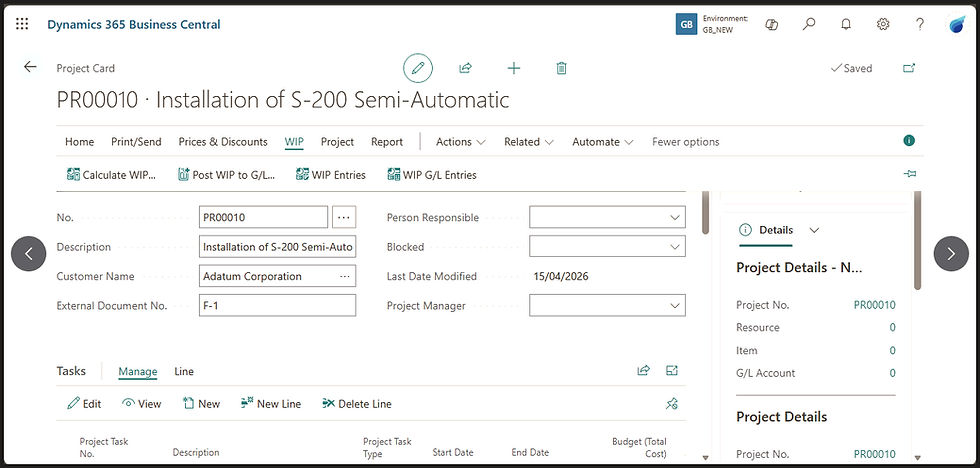
The process first computes the recognised cost and recognised sales for the period according to the WIP method rules. It then derives the unrecognised amounts automatically as the residual difference between the actual cumulative values and the recognised values. The calculation produces Project WIP Entries that store the results temporarily for review. These entries can be reversed before the WIP amounts can be posted to the general ledger. This multi-step logic aligns the financials as the project progresses without requiring any change to the underlying data.

When users post the WIP values to the general ledger using the Post WIP to G/L function, the system creates journal entries that route exclusively through the accounts defined in the project posting group.

Recognised amounts flow to income statement accounts, while unrecognised WIP balances post to designated balance sheet accounts.
Architecture of Project Posting Groups
Project posting groups function as the configuration bridge that connects the projects module to the general ledger. They define the precise general ledger accounts that receive every WIP-related posting, including costs, recognised expenses, accrued amounts, and applied balances.
During a Business Central implementation, the finance team and the consultants create these groups, which are then assigned to individual projects or defaulted at the setup level, ensuring that the WIP calculation results always route to the correct accounts according to the selected WIP method.
Role of Project Posting Groups
When the Calculate WIP function runs, it produces Project WIP Entries that contain the recognised and unrecognised amounts. These entries do not post directly to the general ledger. Instead, the system reads the project posting group assigned to the project and substitutes the appropriate general ledger account numbers into the journal lines. For example, unrecognised costs post to the WIP Costs account defined in the group, while recognised costs post to the Project Costs Applied account or the direct expense account, depending on the WIP method. This design isolates the account selection logic from the calculation logic, allowing companies to change posting destinations without altering the WIP methods themselves.
Key Account Mappings and WIP Methods Dependencies
Project posting groups contain fields that map to general ledger accounts for each category of WIP posting: WIP Costs, WIP Sales, Recognised Costs, Recognised Sales, and the corresponding applied accounts (Project Costs Applied, Project Sales Applied, Item Costs Applied, etc.).

The exact accounts used depend on the WIP method selected on the project.
For instance, methods that recognise costs before invoicing require the Cost of Sales account to be populated, while percentage-of-completion methods rely on the accrued sales and WIP sales accounts. The architecture validates these dependencies at setup so that incomplete mappings prevent posting and maintain balance in the journal entries.
How to Nail the Correct Configuration
Organisations can define multiple project posting groups and link them to project types or individual projects via the Project Posting Group field on the project card.
Organisations that use Business Central to manage projects typically create multiple project posting groups when they need different general ledger account structures for different kinds of projects. For example, one group for fixed-price projects, which might map to specific WIP sales and recognised revenue accounts that reflect over-time recognition. Another group can be for time-and-materials projects, which use different cost-of-sales and accrued-cost accounts.
Another option is to separate groups by department or customer segment, such as one for internal development projects, where transactions post to internal overhead accounts, versus external billable projects that must post to revenue-related accounts.
Companies use more than one group because it lets them control the exact financial treatment in the general ledger without changing the WIP method itself; each group acts as a tailored bridge to the chart of accounts, so interim reporting and profitability statements stay accurate for the specific nature of the project. However, in simpler implementations, a single project posting group can be applied to all projects by default.
WIP Methods for Cost Recognition
Business Central come with a set of system-defined project WIP methods, also called standard. The standard WIP methods for cost recognition determine the rules when calculating how much of a project’s incurred costs should appear in the general ledger as recognised expenses during interim reporting.
Five built-in methods exist, but only two focus on cost recognition:
Cost Value.
Cost of Sales.
Users typically select one of these methods on the project card or configure it as the default method for all projects.
Cost Value Method
The Cost Value method recognises cost as it is incurred. The formula reads the cumulative actual cost from project ledger entries and recognises that figure directly, so recognised cost equals actual cost for the period.
Business Central treats any difference between this recognised cost and the actual posted cost as the unrecognised WIP cost balance. Companies use this method when they want cost recognition to mirror the physical or technical progress of the project, independent of invoicing activity, which would happen in the Order-to-Cash process. The posting flow routes the recognised cost through the Project Costs Applied account or the direct expense account defined in the project posting group, while the residual posts to the WIP Costs account.
Cost of Sales Method
The Cost of Sales method links cost recognition directly to the invoiced sales amount. It calculates recognised cost as the invoiced price multiplied by the budgeted cost-to-price ratio. The system pulls the invoiced price from project ledger entries and applies the ratio derived from the project’s budgeted totals. Any difference between this figure and the actual posted costs becomes the unrecognised cost balance posted to the balance sheet.
This method ensures that costs appear in the general ledger in the same period as the related revenue, aligning the income statement with the matching principle. The posting routine routes the recognised cost to the Cost of Sales account specified in the project posting group, with the WIP cost residual going to the WIP Costs account.
Because the methods operate at the project level and reference budgeted values, any change to the budget after WIP has been posted requires recalculation and a new posting to keep the general ledger synchronised. This design maintains strict traceability while giving companies control over when and how costs flow into financial statements.
WIP Methods for Sales and Revenue Recognition
The standard WIP methods for sales and revenue recognition establish the rules that the system applies to calculate how much of a project’s invoiced or contract revenue appears in the general ledger as recognised sales during interim periods.
Three of the five built-in methods focus on the sales side:
Sales Value.
Percentage of Completion.
Completed Contract.
Users select one of these on the project card, or configure one as the default for all projects. This selection controls the timing of revenue recognition in the income statement and the corresponding unrecognised WIP sales balance on the balance sheet, while always routing the results through the accounts defined in the project posting group.
Sales Value Method
The Sales Value method calculates recognised sales as a proportion of the total budgeted sales, based on the percentage of completion derived from actual costs incurred versus budgeted costs.
The system reads cumulative cost from project ledger entries, divides it by the total budgeted cost, and multiplies the result by the total budgeted sales price. The architecture treats the difference between this recognised sales amount and the actual invoiced sales as the unrecognised WIP sales balance. Companies apply this method when they want revenue recognition to follow project progress independently of the actual invoicing schedule.
The posting flow directs the recognised sales through the Project Sales Applied account in the project posting group, while the residual posts to the WIP Sales account.
Percentage of Completion Method
The Percentage of Completion method uses the same underlying formula as the Sales Value method: cumulative actual cost divided by total budgeted cost, multiplied by the total budgeted sales price. The difference is in how the result posts to the general ledger. Sales Value posts the recognised amount to the Project Sales Applied account (or the direct sales account), Percentage of Completion posts to the Recognised Sales account, keeping the recognised revenue visible as a distinct line in the income statement. The unrecognised residual posts to the WIP Sales account on the balance sheet in both cases.
Companies typically select Percentage of Completion when they need revenue recognition to follow project progress under the over-time recognition principle in common accounting standards, and want that recognition reported through a dedicated account rather than the applied account used for operational matching.
Learn more about over-time recognition in this article from the Deloitte Accounting Research Tool.
Completed Contract Method
The Completed Contract method defers all revenue recognition until the project reaches completion. Until then, the system recognises zero sales in the general ledger, regardless of costs incurred or invoices issued. The entire invoiced amount remains as an unrecognised balance on the balance sheet (typically in the WIP Sales or Accrued Sales account).
When the project status changes to Completed, Business Central reverses the prior WIP balances and posts the full actual sales from the project ledger entries directly to the revenue accounts. Companies choose this method when revenue can only be recognised at a point in time upon contract fulfilment, such as certain fixed-price or milestone-based contracts. The design ensures no interim income statement impact occurs until the final reversal.
Combine Cost and Sales Recognition within Each WIP Method
Every standard WIP method in Business Central is constructed as a paired combination of one cost-recognition rule and one sales-recognition rule. When users open the Project WIP Methods page, they see two separate columns: WIP Costs and WIP Sales because the architecture treats the two sides independently within the same method. The checkboxes for WIP Cost and WIP Sales are ticked for all standard methods simply to indicate that the method is permitted to generate entries on both sides of the project.

In practice, companies can configure the sales side separately from the cost side. For example, selecting the Cost Value method fixes the Recognised Costs rule to “Cost of Sales”, but the Recognised Sales field remains editable in the dropdown.

Companies can therefore keep revenue recognition on an “as invoiced” basis, such as with Contract - Invoiced Price, or override it to another rule, such as Percentage of Completion or Sales Value.
Reversal Mechanism on Project Completion
When a finance manager or the project lead changes the project status to Completed and runs the final Calculate WIP and Post WIP to G/L, the system automatically triggers a reversal of all prior WIP postings.
This reversal removes the recognised amounts from the temporary applied accounts in the income statement, such as Project Costs Applied, Project Sales Applied, etc. It clears the WIP Costs and WIP Sales balances from the balance sheet. It then posts the full actual cumulative costs and sales directly from the project ledger entries into the final profit and loss accounts.

When a manager changes the project status to Completed and runs the final Calculate WIP + Post WIP to G/L, the system does two things in one go:
It reverses every prior WIP posting that has ever been made for the project. This reversal zeros out the WIP balance-sheet accounts and removes the earlier recognised amounts from the temporary applied accounts in the income statement.
It then posts the full actual cumulative costs and sales directly from the project ledger entries into the final cost and revenue accounts in the income statement.
The net result in the general ledger across the entire life of the project is the true totals. The incremental recognitions in earlier periods are undone by the reversal and replaced by the single, complete posting at the end.

If a company prefers to keep the temporary applied accounts completely separate, as pure clearing accounts that always net to zero, they can configure the posting group that way too, but the vast majority of setups use the same accounts, so the close-of-project posting simply replaces the incremental recognitions with the final correct totals.
Configuration Dependencies
The entire project posting flow depends on three core settings: the WIP method selected on the project card, the project posting group assigned to the project, and the WIP Posting Method Used field that determines whether the project posting group or the default general ledger setup governs the accounts.
Changes to any of these settings after WIP has been posted require recalculation and re-posting to keep the ledger synchronised. Business Central also respects dimension inheritance from the project card to the project tasks, so the posting flow remains consistent with the broader financial reporting policies. Because project posting groups act as the sole bridge to the chart of accounts, any modification to account mappings immediately affects every subsequent WIP posting and reversal for projects using that group.
Next Steps
If your company is using projects and wants to learn more about advanced features or even review current configuration, check our adoption learning program here: Dynamics 365 Adoption Training


Comments