
Segregation of Duties: BC vs Dynamics 365 F&O
- Alfredo Iorio

- Apr 17
- 9 min read
Segregation of duties (SoD) is an internal control principle often called the "four-eyes" principle that divides critical, high-risk tasks among multiple people to prevent fraud, errors, and malicious activity. It ensures no single individual has enough control to both perpetrate and conceal errors or fraud, breaking duties into authorisation, custody, recordkeeping, and reconciliation. When evaluating a new ERP, finance managers often ask if Business Central and Dynamics 365 Finance and Operations support SoD. In this post, we will learn what is SoD, the compliance framework behind it and how these two Microsoft ERPs handle SoD.
What is COSO, The Framework for SoD
COSO stands for the Committee of Sponsoring Organisations of the Treadway Commission. It is the globally recognised framework that companies and auditors use to design, implement and evaluate internal controls.
In the Dynamics 365 context, it is the reference point that determines whether the security model, configuration and approval processes in Business Central or Finance and Operations protect the integrity of financial data and operations.
The framework focuses on five components, but the part relevant to segregation of duties sits inside the Control Activities component. Organisations select and develop control activities that reduce risks to the achievement of their objectives to an acceptable level. Those objectives include producing reliable financial statements, safeguarding assets and complying with laws and regulations.
Learn more about the COSO framework here: https://www.coso.org/guidance-on-ic
Risks are anything that could prevent those objectives from being met, for example, a user having the power to create a vendor record and to authorise payments to that vendor. Mitigation means putting controls in place, including segregation of duties, so that the likelihood and impact of such risks drop to a level the company can accept.
COSO Principle 10: Control Activities and Segregation of Duties
COSO has seventeen principles; Principle 10 requires that organisations address segregation of duties within their control activities, not necessarily everyday operations. Some functions within the business are deemed incompatible and therefore must be separated.
A user who authorises a transaction should not be the one who records it. A user with custody of an asset should not be the one who reconciles it.
For example, a user who authorises a transaction, like a purchase or a payment, should not be the same person who records it. Custody of the related asset means having direct control. In a bank account context, the person who can create, approve or post a bank transfer or payment journal has custody of that cash because they control whether funds actually leave the company. They “hold” the asset in the sense that they can move it.
Reconciliation is the separate, independent check that verifies everything is correct. The person performing the bank reconciliation compares the bank statement against the ledger entries in Business Central or Finance and Operations to confirm that every payment and receipt is legitimate, properly recorded, and that nothing fraudulent or erroneous is hidden.
If the same person does both, they could make an unauthorised transfer and then adjust or omit it during the reconciliation so the books still balance and the fraud goes undetected. COSO requires these two functions to be performed by different people so one acts as a check on the other.
This separation is exactly why the setup around privileges, duties and permissions in both F&O and BC products matters: it either makes it easy to keep these functions apart by design or leaves the organisation having to rely on manual reviews and workflows to achieve the same protection.
The framework is principle-based, not prescriptive. That means it does not list exact duty combinations or demand software features. Where full segregation is impractical because of company size or cost, management can use alternative controls such as supervisory reviews or workflow approvals, provided those alternatives achieve the same risk reduction.
How F&O and BC handle Principle 10
Because COSO is the benchmark used by external auditors when they test internal control over financial reporting, the setup and configuration of a company's ERP must demonstrate compliance with SoD. Therefore, the question is not which product supports Segregation of Duties, because both do that in different ways, but how the company and the implementation partners set up the system and how management monitors that the entire organisation stays compliant.
In Finance and Operations, the system’s security architecture includes a dedicated segregation-of-duties rule engine inside the role-and-duty hierarchy. When you build or change a role, the system automatically checks every duty combination against the rules you have defined and blocks any conflict before it can be saved. This makes enforcement straightforward: the architecture itself prevents a user from holding incompatible access rights across transaction stages, and the audit trail of any approved override sits directly in the security logs. The posting flows and ledger entries are therefore protected by design.

Business Central’s architecture works differently. There is no built-in rule engine that automatically detects or blocks conflicting permission combinations. So companies must design their permission sets to keep incompatible activities apart, and then rely on approval workflows or separate reviews to catch anything that slips through. When full separation is hard to achieve because of team size or process complexity, the organisation must use manual compensating controls, such as periodic access reviews or third-party monitoring tools, to demonstrate that the COSO risk has still been reduced to an acceptable level.
One product’s architecture carries more of the segregation burden automatically; the other shifts more of that burden onto the configuration team and ongoing oversight. That is exactly why the choice of product influences how much effort and cost go into maintaining a COSO-compliant control environment.
How F&O Enforces SoD Natively
Dynamics 365 Finance and Operations incorporates a dedicated segregation of duties engine directly into its security architecture. This capability exists because the product was engineered to support automated internal controls that align with regulatory expectations, such as SOX, where manual compensating controls alone are insufficient for demonstrating effective design and operation of controls over financial reporting.
More about SOX compliance framework here: https://www.sarbanes-oxley-act.com/
The foundation is the layered security structure of roles, duties, privileges and permissions. Duties group together related privileges that reflect business tasks, such as maintaining master data or processing transactions. These duties are assigned to security roles, which are, in turn, granted to users. Because duties sit at this intermediate layer between roles and the underlying permissions, they become the precise point where segregation rules can be defined and enforced without disrupting the broader posting flows or ledger architecture.
The Native Segregation of Duties Rule Engine
Finance and Operations provides a built-in module under System administration > Security > Segregation of Duties. Administrators create rules that declare specific pairs of duties as incompatible. For example, the duty to authorise purchase orders can be ruled incompatible with the duty to process vendor payments. Once these rules are active, they apply system-wide and operate independently of any custom code or extensions.
The architecture performs real-time validation at two key moments. When a security role is created or modified, the system checks whether the combination of assigned duties violates any active segregation rules and prevents the role from being saved if a conflict exists. When an administrator assigns roles to a user, the system performs the same check across all of the user’s roles. A conflict blocks the assignment unless an authorised override is recorded together with a documented business justification. This override is logged permanently and becomes part of the audit trail available for compliance testing.
Implications for Posting Flows and Ledger Integrity
Because the rules operate upstream of the transactions, the posting engine, journal entry creation, master data updates and approval workflows are protected by the security configuration. Incompatible access cannot reach the ledger or the financial statement assertions. This design reduces reliance on manual reviews or third-party monitoring tools. As a result, it helps lower the ongoing costs of keeping internal control over financial reporting in check, while still allowing room for exceptions.
How Business Central Handles SoD
Business Central implements segregation of duties through its permission-set-based security model and approval workflows rather than through any dedicated rule engine that automatically detects conflicts. This design reflects the product’s focus on flexibility and cost-effectiveness for mid-market organisations, where the system architecture places responsibility for control design on the configuration team instead of embedding automated enforcement at the duty level.
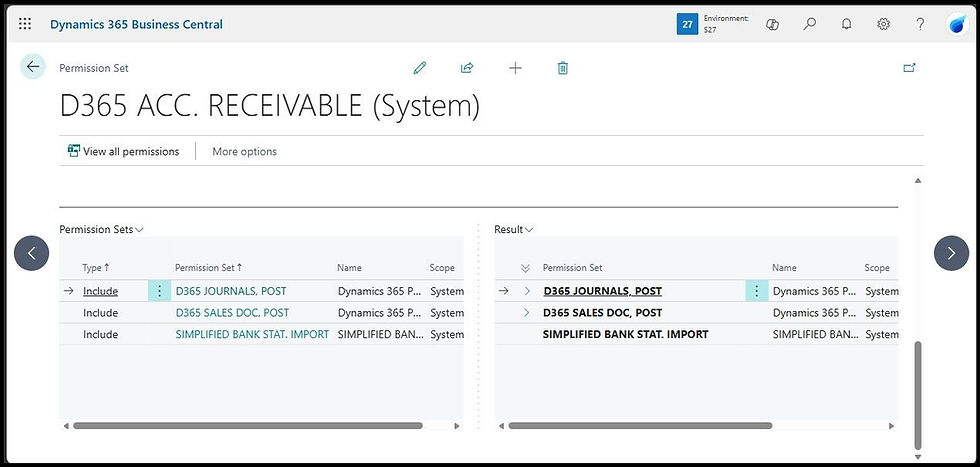
Permission sets grant granular rights: Read, Insert, Modify, Delete or Execute, directly on the underlying tables, pages, reports and codeunits that drive every transaction and master-data process. Companies combine multiple permission sets and assign the resulting bundle to users either directly in the system or through Microsoft Entra ID security groups. More about permissions in this other post: Business Central Permission Sets: The Complete Setup Guide
Because rights are defined at the object level, the ledger posting engine and financial modules receive access only through these permission sets; there is no intermediate duty layer that can be validated automatically for incompatibility.
Approval Workflows and Absence of Native SoD Rule Validation
Business Central contains no built-in SoD engine comparable to Finance and Operations. The system does not scan permission combinations during role or user configuration, nor does it block assignments that would grant one person end-to-end control over a process. The architecture, therefore, relies entirely on the setup of permission sets to keep incompatible functions separate.
Approval workflows act as the operational bridge that enforces separation where permission sets alone cannot achieve it. Microsoft provides ready-to-use workflow templates that companies configure to route records for review before posting is allowed. For purchase invoices and other purchase documents, companies use the Purchase Approval Workflow. The user who creates the invoice chooses Send Approval Request; the document status immediately changes to Pending Approval, and the record locks so no one can post it.
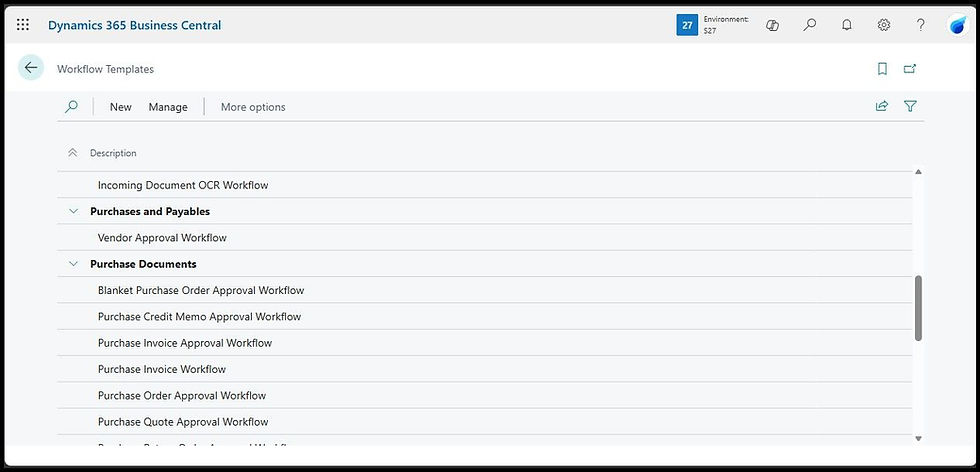
A different user, defined on the Approval User Setup page, reviews it and either approves or rejects it. Only after approval does the status return to Open, at which point an authorised user can run the Post action, and the system creates the ledger entries. The same pattern applies to payments and general journals.
Limitations of Approval Workflows on Master Data Records
For master data changes, the workflows cover new or modified records on customer cards, vendor cards, item cards, G/L accounts, or even specific sensitive fields such as Vendor Bank Account No.
The workflow for master data changes must be explicitly configured by the company or the implementation partner because it is not enabled out of the box. When users add the “Add record restriction” response to that workflow, the system does restrict usage of the pending record in certain scenarios. Still, the restriction does not prevent the creation of new orders.
In practice, the old values on the customer record remain fully active and usable while the approval is pending. This means users can still select that customer on a new sales invoice, and the system will create the document using the current data. The pending change itself is held back and not applied until a separate approver clears the workflow. The restriction mainly prevents the posting of certain unapproved documents that are tied directly to the workflow event, not a blanket block on every transaction that references the master record.

For broader restrictions beyond the built-in document-posting examples, a partner usually needs to extend the workflow, as confirmed by Microsoft in this article: https://learn.microsoft.com/en-us/dynamics365/business-central/across-how-to-restrict-and-allow-usage-of-a-record. Many organisations, therefore, combine the approval workflow with other controls, such as manually setting the Blocked field on the customer card during the pending period or running periodic access reviews, to achieve the full segregation effect.
This configuration-dependent approach allows organisations to scale controls to their size and complexity. Still, it shifts ongoing maintenance effort onto the finance and IT teams rather than relying on automated enforcement.
The Decision: Which Product Fits Which Control Requirement
Finance and Operations delivers stronger automated enforcement because its security architecture includes a dedicated segregation-of-duties rule engine that validates duty combinations in real time. That makes the control environment more robust from a pure compliance standpoint, especially where auditors expect system-level prevention of conflicts rather than relying on manual oversight. The posting flows and ledger entries are protected upstream, which reduces the risk that a user could ever reach a sensitive transaction with incompatible access.
Business Central’s architecture, by contrast, gives companies far more flexibility because it does not have that automated engine. Permission sets can be combined in almost any way that fits the organisation’s actual team structure and processes, and approval workflows can be configured to bridge any gaps without the system blocking legitimate assignments.
For many small and medium-sized businesses, this is not a limitation; it is a practical advantage. Smaller teams often cannot achieve perfect segregation across every duty because there simply are not enough people. Hence, the ability to design permission bundles that match real operational needs while still using workflows for separation becomes more workable and less disruptive to day-to-day operations.
F&O’s model shifts the control burden onto the system itself, which suits larger or highly regulated environments. Business Central shifts that burden onto configuration and ongoing reviews, which many SMBs find better matches their size, cost constraints and need for agility.
Neither approach is universally better; The choice turns on the required strength of preventive versus detective controls, the volume and complexity of posting flows, and the cost of ongoing internal-control maintenance.
Next Steps
If you use BC or F&O and want help configuring segregation of duties or permissions, we review your setup and train your team against COSO and SOX expectations. Book a free assessment.


Comments