
Number Sequence
- Meetasha Suneja

- Jan 6
- 2 min read
In Dynamics 365 Finance & Operations, Number Sequences are utilized to automatically assign unique identifiers to records such as vouchers, invoices, customers, vendors, journals, and assets. They provide consistency, prevent duplication, and enable seamless transaction processing across various modules. Number Sequence: A number sequence is used to assign a unique identifier to each transaction or operation, serving as a reference for tracking and differentiation across processes. Number Sequence Setup
Generate: Activates automatic numbering based on predefined rules.
Number Sequence: Defines the structure (format, prefix, starting number) for unique identifiers.
Purpose: Ensures consistency, prevents duplication, and streamlines transaction processing across modules.

In Identification we will provide "Name" and "Number Sequence Code"
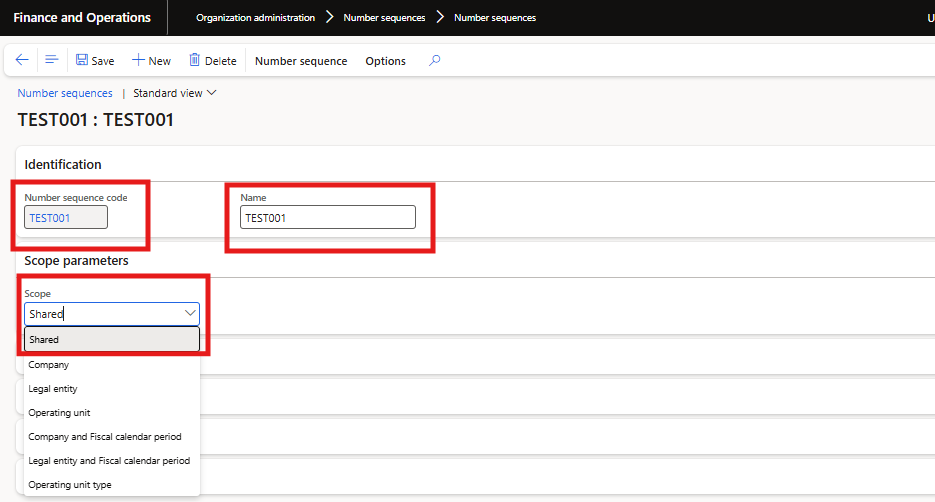
Scope parameters determine the organizational level at which a number sequence is applied:
Shared: Enables the number sequence to be used across all legal entities within the system.
Company: Restricts the number sequence to a specific company.
Legal Entity: Applies the number sequence to a designated legal entity only.
Operating Unit: Limits the number sequence to a particular operating unit, such as a department or business division. Scope parameters determine the organizational level at which a number sequence is applied:

Company Scope & Reference Setup
Company scope includes three segments: company name, constant, and alphanumeric. Segments can be added or removed.
References are linked by specifying the module name and the target field for the number sequence.

Here we are not adding any reference
If we are using this number sequence it will be automatically turned into in use otherwise it will be disabled. If we allowing manual, we can give number sequence manually. Continuous: the number sequence will be in continuous manner, There will no gaps in the sequence Using a non-continuous number sequence allows you to enable preallocation, which improves performance for high-volume transactions such as sales orders and purchase orders. This setup permits gaps in the sequence.
Once the number sequence is created, it can be assigned to various components such as:
Journal names (as voucher series)
Module parameters for documents like customer records, vendor entries, fixed assets, and budgets.


Comments